Every nurse call for help, heard, sorted,
and answered.
Care Concierge turns a scan, a tap, or a spoken word into a prioritized task on your team's live floor view, and keeps family in the loop the moment it's resolved.

Every call light looks the same, until someone walks over to check.
Requests arrive with no context
A lit call button doesn't say whether it's water, pain, or a fall. Staff walk the hall to find out, one room at a time.
Nothing is prioritized
An urgent request and a routine one wait in the same silence. Without a queue, the loudest room gets attention first, not the neediest.
Family finds out last
Even when a request is handled well, the family member who called to ask “did anyone check on them?” has no way to know.
From bedside to resolved, in one continuous line.
No app to install, no account to create at the bedside: a request becomes a tracked task the instant it's sent.
Patient sends a request
Scan the bedside QR code, tap a tile on the room's iPad, or speak it, in the language they're most comfortable in.
It's typed and timestamped
Every request lands with a category, an urgency flag, and a room, instantly. No triage phone call required.

Staff see it, live
The bay map, dashboard, and feed update in real time. Anyone on shift can acknowledge, reassign, or resolve it.
Family sees it resolved
If they've been invited to follow that resident, they'll see the update in their own activity feed, along with who handled it.
Everything a floor needs. Nothing it doesn't.
Six pieces that work as one system, configured for your facility, not the other way around.
Two ways in, built for who's asking
A visiting family member scans the QR code on their own phone. A resident who can't hold one taps a large icon on the room's mounted iPad, or just speaks the request out loud.
- QR code per room: no app, no login, works on any phone
- iPad kiosk mode: large touch tiles for a shared, always-on device
- Type or speak an open-ended request that doesn't fit a tile
One live view of the whole floor
The bay map shows every room's status at a glance. The dashboard queues requests by urgency. The feed shows every event as it happens: no refreshing, no walking the hall to check.
- Color-coded bay map, updated in real time
- Acknowledge, reassign, and resolve from any device
- Staff chat for handoffs, without leaving the queue
Family, kept in the loop without a phone call
Invite a resident's family to a private portal. They see resolved requests with staff attribution, planned and completed activities, and can message your team or send their own quick check-in requests.
- Invite-only family accounts, scoped to one resident
- Direct messaging between family and care team
- Activities planner: family sees what's scheduled and done
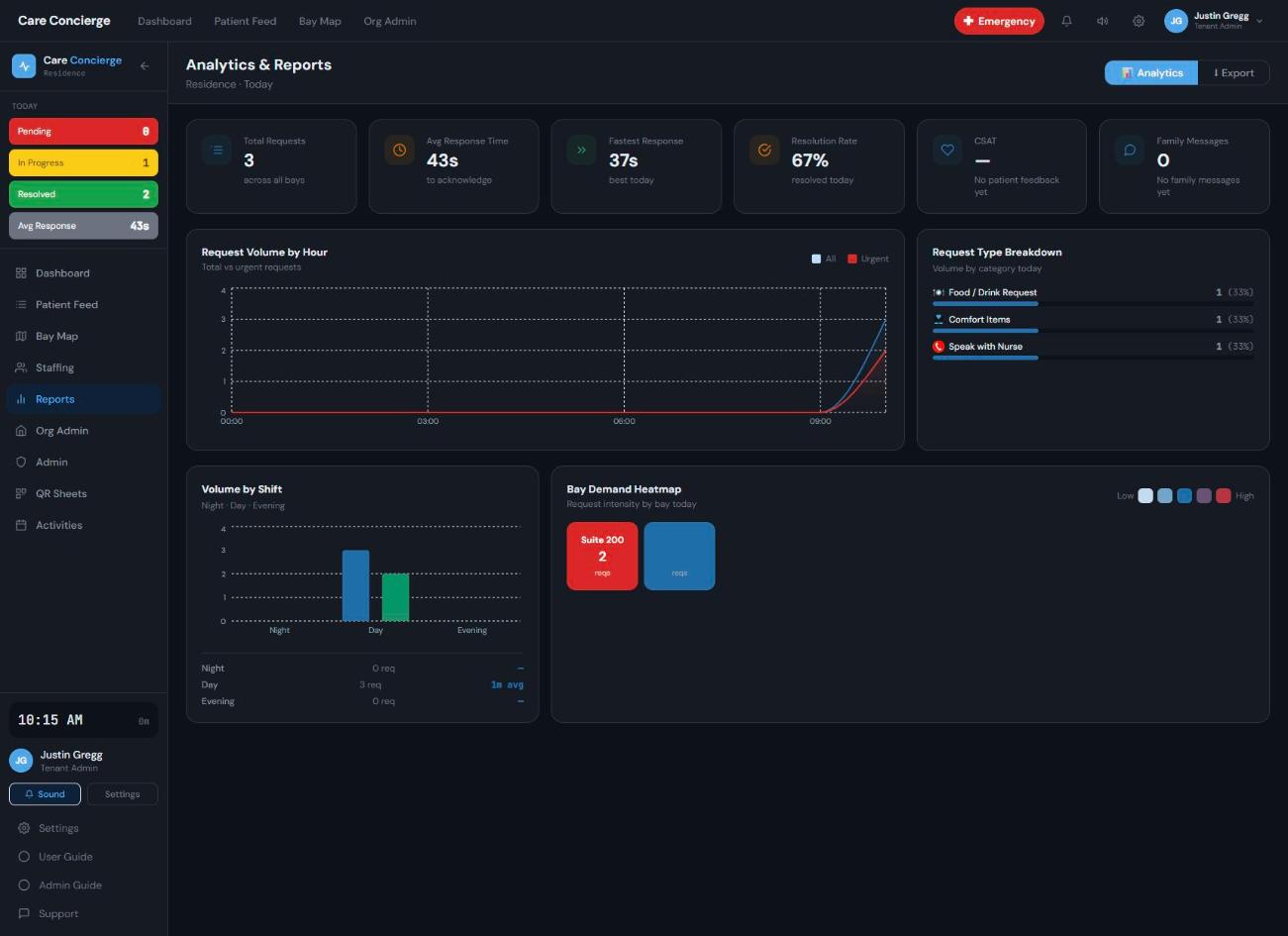
Reports that inform staffing, not just archive requests
See response times, request volume, and resolution rates by shift, bay, or staff member. Export what a shift handover or a board meeting actually needs.
- Live analytics: volume, response time, resolution rate
- CSV and DOCX exports: bay summary, staff performance, shift report
- Configurable retention: nothing deleted, just archived on schedule
Set up your way. No IT ticket required.
Build out your sites, units, and rooms; write your own request types with your own icons and urgency rules; invite staff and scope their access, all from a self-serve admin panel your facility manager can run.
- Sites → units → rooms, printed QR sheets in a click
- Custom request types per audience: patient and family, separately
- Role-based access, from tenant admin down to volunteer
These are live screens, mid-shift.
No staged data: this is the Bay Map, Dashboard, and iPad kiosk running against a real facility's rooms and requests.
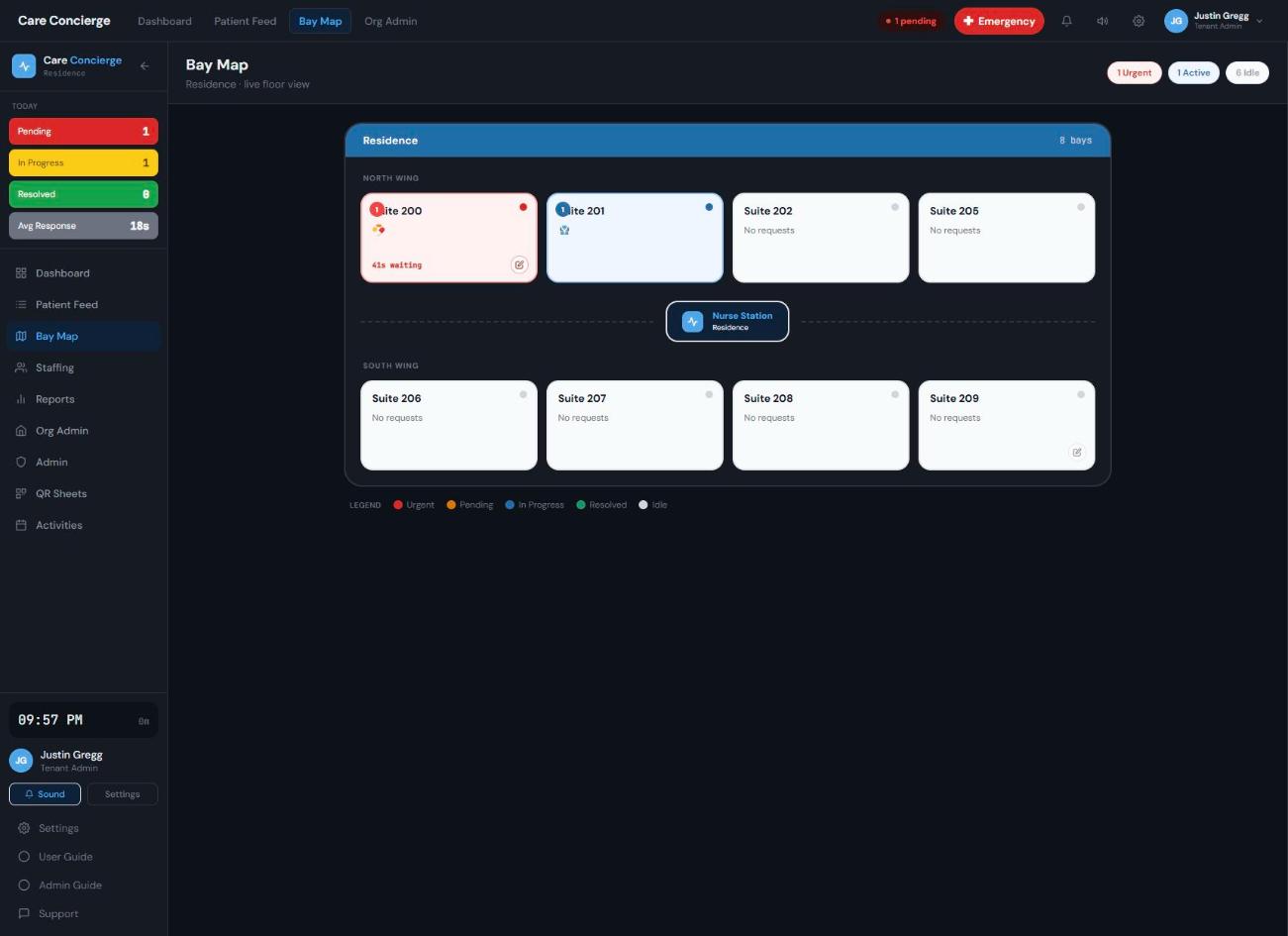
Bay Map
Every room, color-coded by status, updating the instant a request lands or gets resolved.
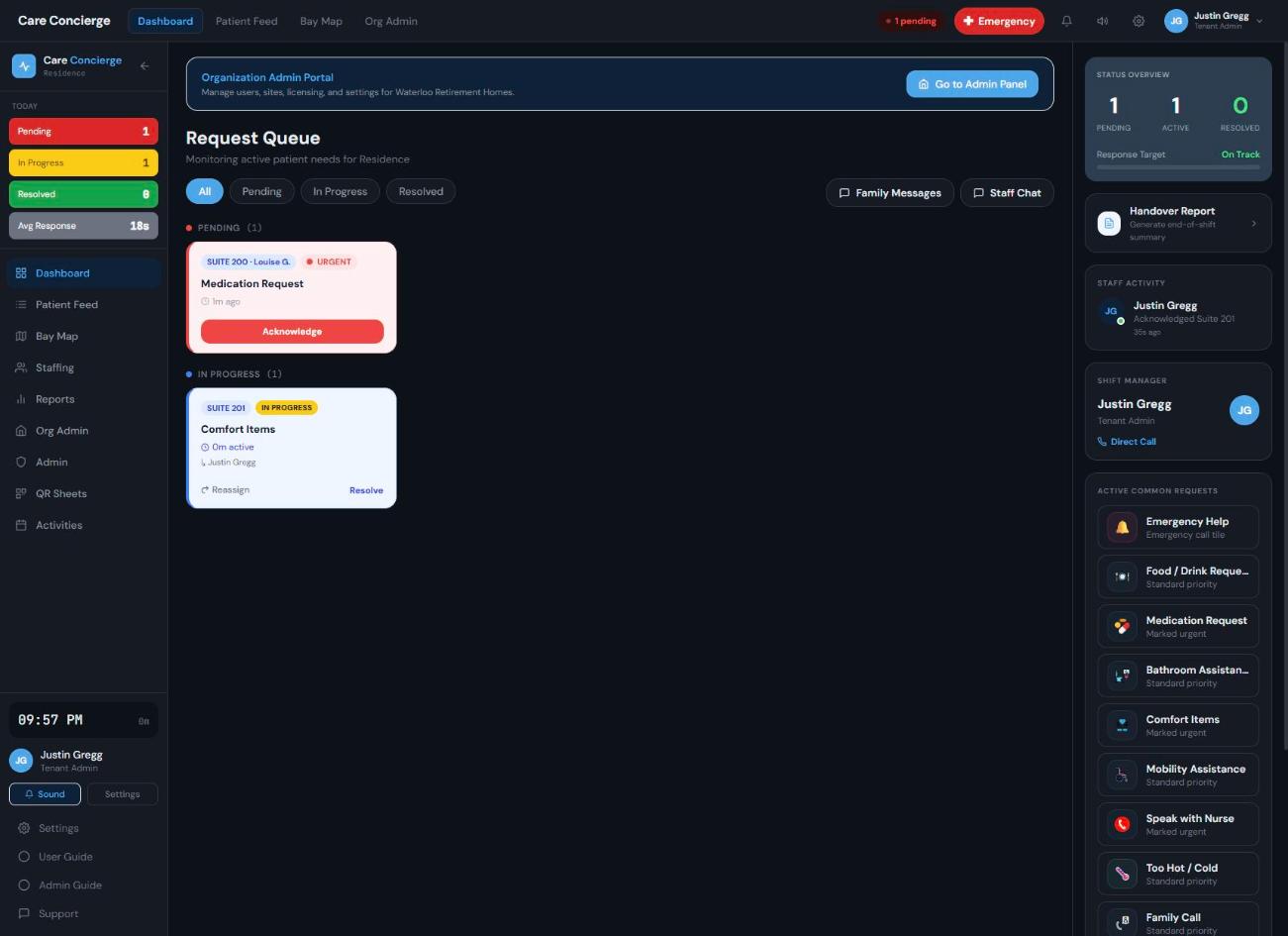
Dashboard
A prioritized queue with one-tap acknowledge, reassign, and resolve.
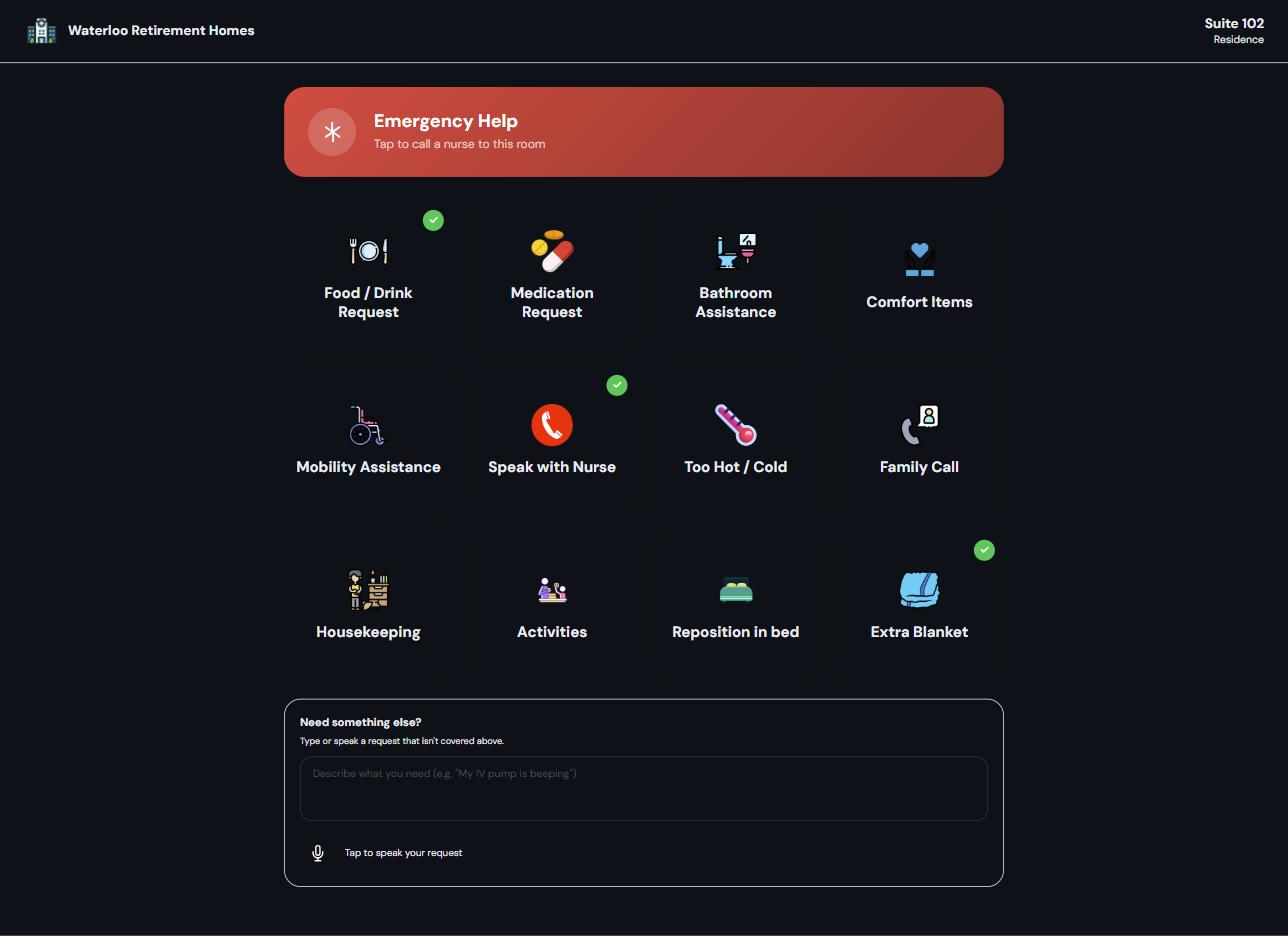
iPad kiosk
Large touch tiles for the room's mounted device: each one tracks its own status, so a resident can flag more than one need at a time.
One system, tuned to how your setting actually runs.
Hospitals & acute care
High turnover, high acuity: urgent requests surfaced first, shift-by-shift reporting for handovers.
Retirement & long-term care
Fewer, longer-staying residents, where the family portal and activities planner matter most.
Rehab & assisted living
Mixed independence levels: QR for mobile residents, kiosk mode where a tap beats a scan.
Multi-site groups
One tenant, many campuses: scoped admin roles per site or unit, one reporting view across all of them.
Not a new device to manage. A clearer way to run the one you already have.
A request is acknowledged and tracked the moment it's sent, instead of wondering if the call button even registered.
One prioritized queue instead of a hallway of unlabeled lights: acknowledge, hand off, and resolve from wherever they're standing.
An invite, not a phone call, is how they find out their person was checked on, with a name attached to the update.
Keep the EMR you already have.
No rip-and-replace. Care Concierge writes back to your existing system of record in real time, deployed parallel to it with zero downtime.
We're early. The problem isn't.
We don't have deployment numbers yet, so we're not going to invent them. Here's what's already been measured by other people about the gap Care Concierge is built for.
Drop in the average time to complete a patient request once nurse call was wired into a clinical communications layer — 127 seconds down to 62 — observed at St Agnes Hospital.
Peer-reviewed observational study, Comput Inform Nurs, 2008Requests a patient makes per day when asking is genuinely easy, at a Philadelphia rehab hospital. The vendor credits the same deployment with over 7,500 nursing hours returned a year.
Vendor-reported, Aiva HealthTypical implementation window for an enterprise long-term care platform. Care Concierge is built so a facility manager can stand up a unit without opening an IT ticket.
Industry directory estimateAll three figures come from third parties writing about this category, not from Care Concierge deployments. Ours will replace them here as soon as we have them.
Not a nurse call replacement. The layer nurse call never had.
Your building already has a system that turns a button press into a light and a chime. It routes a signal. It doesn't say what was asked, in what language, how urgent it was, who picked it up, or how long the person waited — and it has no way to tell the daughter who's been calling the front desk since Tuesday.
| Traditional nurse call | Family engagement apps | Care Concierge | |
|---|---|---|---|
| What the request tells you | A room number | Nothing — it isn't connected to requests | Category, urgency, room, in the resident's own words |
| What it takes to deploy | Wiring, SIP or PBX work, middleware, a procurement cycle | A second subscription and a second login | A browser, the iPads you have, and an afternoon of setup |
| Who learns it was resolved | The nurses' station | Whoever remembers to post about it | The team and the family, with a name and a timestamp |
| What it costs to try | A capital project | A contract per community | One unit, one pilot, nothing removed |
Where we don't compete
If your building needs code-compliant emergency call hardware, keep it — that's a life-safety system and we're not one. Care Concierge runs beside it and takes everything that isn't an emergency, which on most floors is nearly all of it.
Put a number on the minutes you're losing.
Answer three questions about your floor. The estimate updates instantly: no form, no waiting on an email.
The first ten floors decide what the next hundred get.
We're not going to stage case studies we haven't earned. Instead we're taking a small number of design partner sites — one unit is enough — and building the next year of Care Concierge around what happens on them.
What you get
- Setup on your floor plan, with your request types and your roles, at no cost during the pilot
- A direct line to the people writing the software, not a ticket queue
- Your unit's data, exportable, whether or not you continue
What we ask
- One unit, one shift pattern, and a charge nurse willing to tell us when something is wrong
- Thirty minutes every second week for the length of the pilot
- Permission to write about what we learned, with your name on it only if you want it there
Design partner intake is open now, and we're keeping the group small on purpose.
The questions we get in the first ten minutes.
See it running on your own floor plan.
Bring your unit layout, and we'll set up a live bay map with your rooms, your request types, and your roles, so you're evaluating your own workflow, not a demo script.